Saved lists, RIS and ready-made citations
A reader has found five books they need. What next — copy the titles into a notebook? In Katlog they can be collected in a list and sent to Zotero or Citavi with one click.
For a research library, the catalogue is not the end point. The books you find go into a bibliography, a reference manager, an email to a colleague. So the catalogue has to be able to pass on what you found.
The saved list
Every record in the results has a bookmark icon. Marked books are collected in a list, opened with the “My list” button in the header. No login is required: the list is stored in the reader’s browser. The panel shows the title, authors, year and call number of each book.
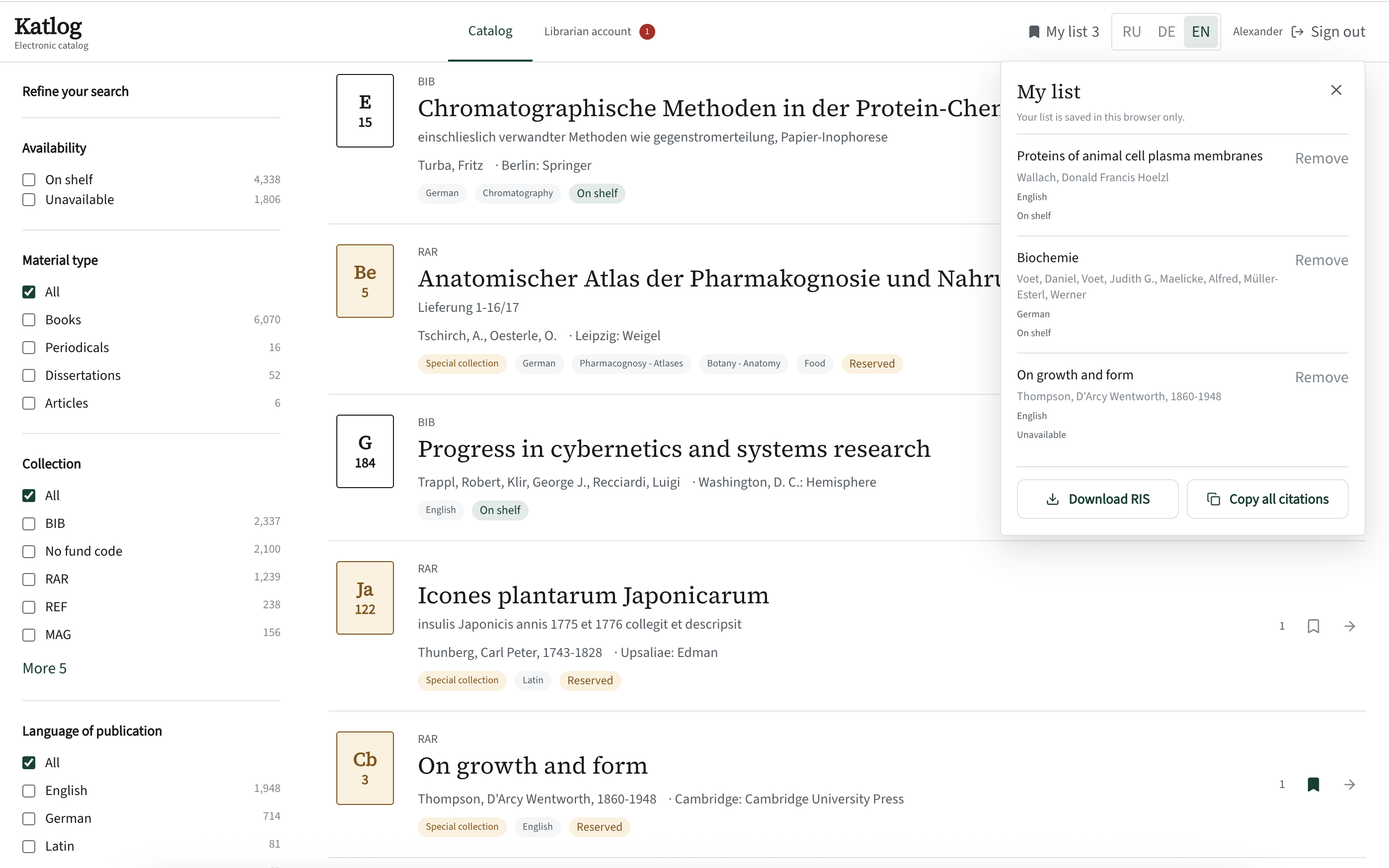
RIS for Zotero and Citavi
The “Download RIS” button creates a file that every popular reference manager understands. It contains authors, title with subtitle, series, edition, year, place, publisher, ISBN, language, subjects, call number and a link to the record in the catalogue. Importing into Zotero takes seconds.
A ready-made citation
Every record page has a citation in the familiar form: authors, title with subtitle, edition, “Place: Publisher, year”, ISBN. Next to it is a copy button. The whole list can be copied at once — one citation per line.
A punctuation detail seems trivial until you picture someone who has pasted twenty such citations into a thesis and now has to fix each one by hand.